You can use HTML tags (markup) to modify and control formatting in ingredient and blend names. Place tags directly in the name field.
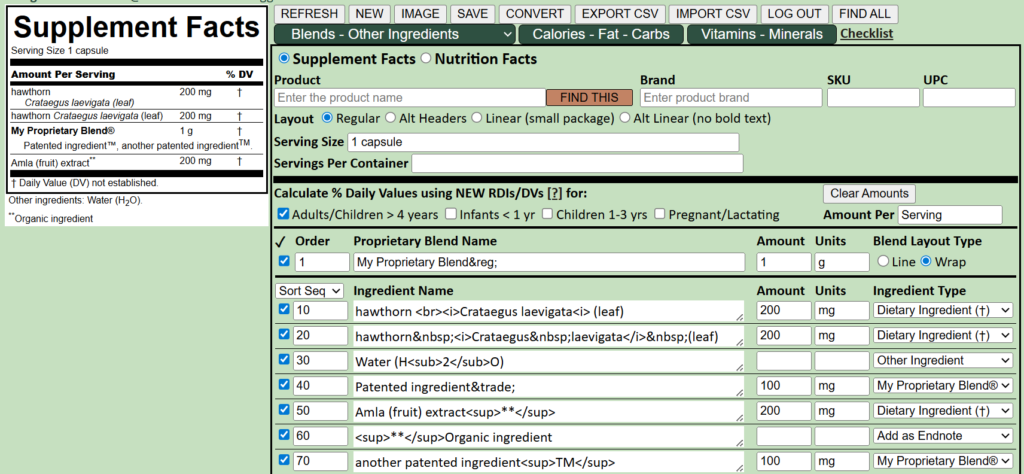
- Italics – useful for Latin names, e.g. <i>Crataegus laevigata<i> renders as Crataegus laevigata
- Bold – To add emphasis <b>i am bold text</b>
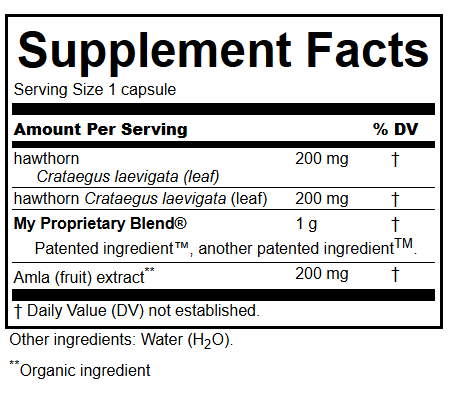
- Add a line break <br> to control formatting, e.g. hawthorn <br>Crataegus laevigata (leaf) splits onto second line at <br>
- Insert non-breaking spaces to keep text together, e.g. hawthorn Crataegus laevigata (leaf) all on one line
- Superscript and subscript <sup> and <sub> – e.g. Water (H<sub>2</sub>O) or Amla (fruit) extract<sup>**</sup>
- HTML entities (special characters) are always terminated by ;
- ™ © and ® for trademarks – e.g. Patented ingredient™ or My Proprietary Blend®
- < (less than) – <
- > (greater than) – >
- é – é
- Degrees – °
- β – e.g. β-carotene
- Fraction – e.g. ½ ½
- More for geeks
- For security, most other tags will be removed.
NOTE: Don’t forget to close tags, e.g. </i>, </b> or the effect may be unpredictable!