The Tabular Nutrition Facts format is intended for packages where there is not enough continuous vertical space for a standard Nutrition Facts label.
Select Tabular from the Nutrition Facts layout options. Enter the product and nutrition information in the same way as for a Regular Nutrition Facts label. The app will arrange the information into the tabular format.

HINT: You may need to apply system fonts or adjust your font settings for tabular formats to get correct font sizes for Calories etc. Use Edit to do so, guidance on sizing is below.
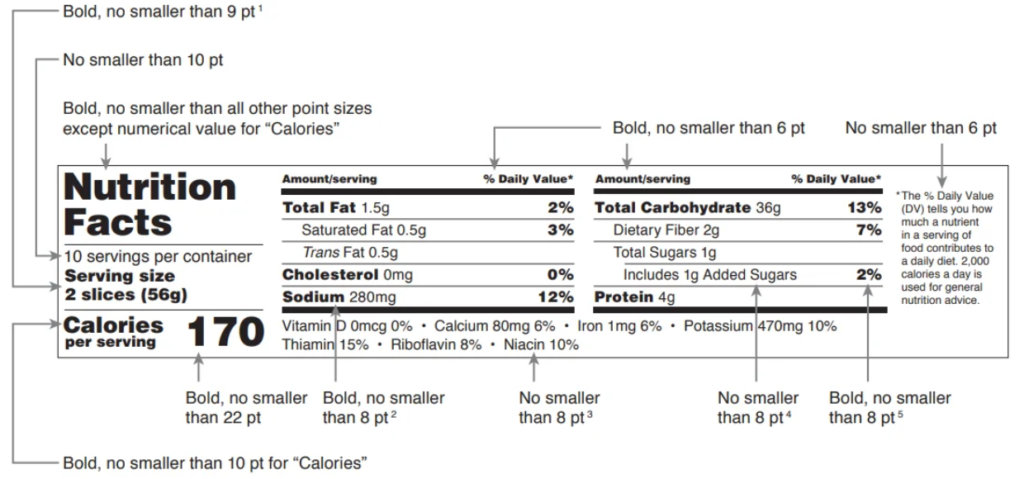
The tabular format should only be used when the available package space does not accommodate the standard vertical format. Two versions of this format are supported:
- Standard tabular display — May be used when there is insufficient continuous vertical space (approximately 3 inches) to accommodate the required components through potassium. § 101.9(d)(11)(iii).
- Tabular display for small/intermediate packages — If the product has a total surface area available to bear labeling of less than 12 square inches, or if the product has a total surface area available to bear labeling of 40 or less square inches and the package shape or size cannot accommodate a standard vertical column or tabular display on any label panel. Nutrition information may be given in a linear fashion only if the label will not accommodate a tabular display. § 101.9(j)(13)(ii)(A)(1).
As with all labels generated by the app, review the finished label carefully for accuracy and suitability for the package before use.
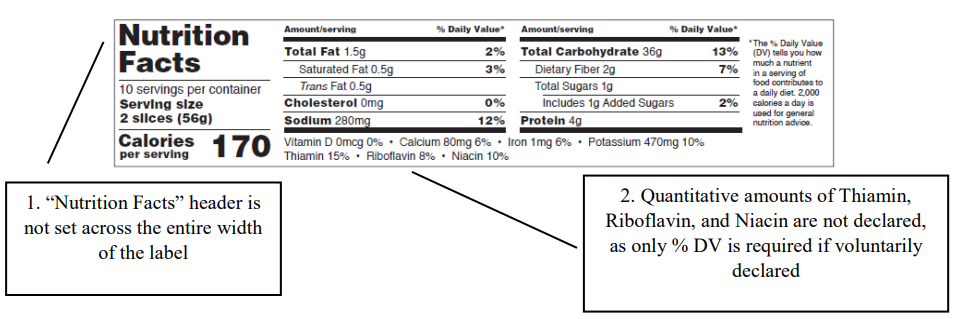
Illustration of Standard Tabular display from FDA’s Small Entity Compliance Guide: Revision of the Nutrition and Supplement Facts Labels (download here)