This feature is especially useful when working with botanicals, proprietary blends, and other non-daily value ingredients that are not easily tracked or found.
This includes both:
- DV nutrients (vitamins, minerals, macronutrients)
- NDV dietary ingredients (botanicals, extracts, blends, other ingredients)
Example:
Search for Echinacea to instantly find all labels that include it — whether listed as a dietary ingredient or part of a proprietary blend.
First, go to the top level menu, where the Ingredients list is most easily accessed. Click Ingredients.

A new tab will open. By default, all your saved ingredients without a % Daily Value, i.e. blend, dietary, and other ingredients will be displayed. To see the source ingredients for %Daily Value vitamins and minerals, choose the other radio button % Daily Value Source Ingredients. Enter search text to find a specific subset.


The results will show the editable name (for updates) and the display name. In this case, you can see I added markup (tags like <i>) to get italics for Latin binomials. To update, change the editable name and press UPDATE. To delete an ingredient, choose DELETE.
⚠️Changes here do not affect existing labels. New ingredients are automatically added when creating or editing a label. This page is for editing, correcting, or deleting existing ingredients in your account-specific library.
If you need to make changes to the labels themselves, choose 🔍FIND. This will automatically open a new search tab, with a list of all the labels that contain that item in a blend, as a dietary ingredient, or as an “other ingredient”. NOTE: You can also find labels with specific ingredients directly from the new Search page, see this post.
Back at the ingredients screen, you can search for % Daily Value source ingredients. Choose the % Daily Value Source Ingredients radio button, and a search text.
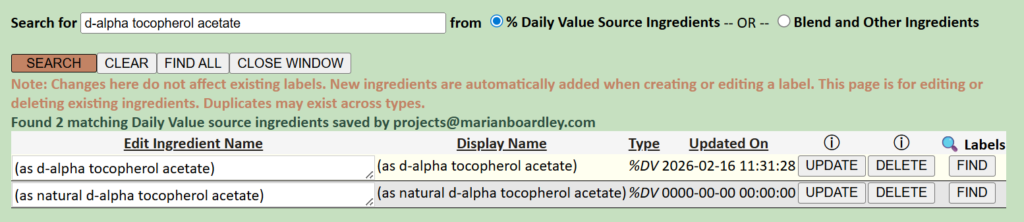
Press FIND to see labels that contain the source ingredient, and access the labels in Search.
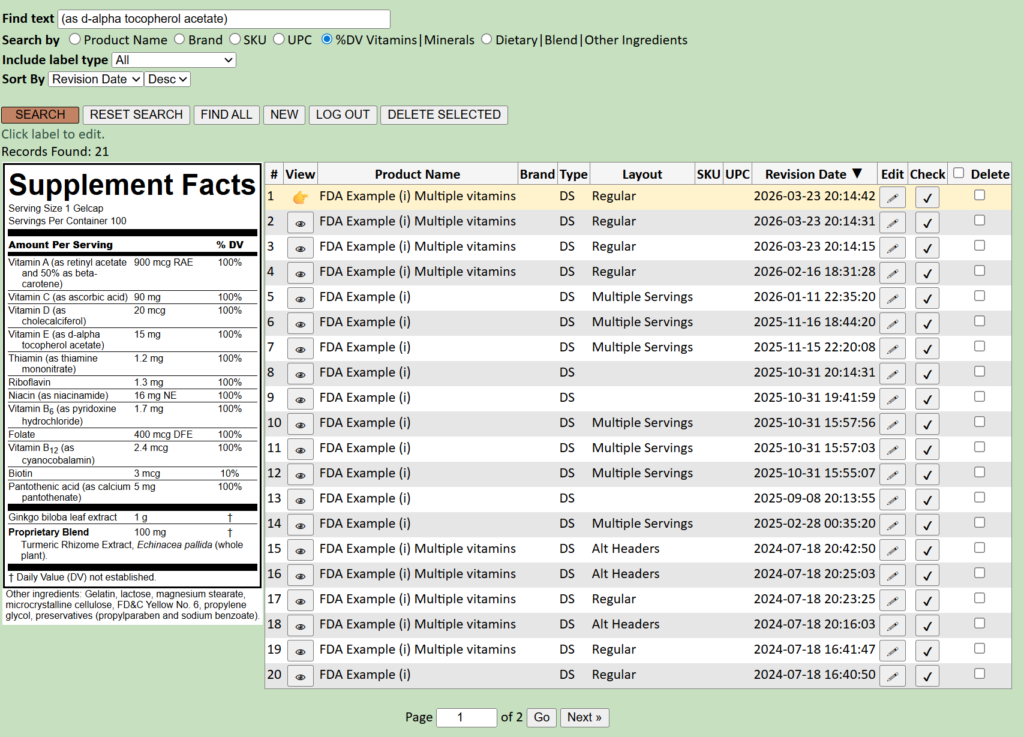
This feature now makes it easier to:
- Locate all labels containing a specific ingredient
- Compare how ingredients are used across products
- Identify all labels potentially affected by ingredient updates